SerpApi
For a comprehensive list of all environment variables related to Web Search (including concurrency settings, result counts, and more), please refer to the Environment Configuration documentation.
Having issues with web search? Check out the Web Search Troubleshooting Guide for solutions to common problems like proxy configuration, connection timeouts, and empty content.
SerpApi API
SerpApi Scrape Google and other search engines from our fast, easy, and complete API. Any existing or upcoming SERP engine that returns organic_results is supported. The default web search engine is google, but it can be changed to bing, baidu, google_news, google_scholar, google_patents, and others.
Setup
- Go to SerpApi, and log on or create a new account.
- Go to
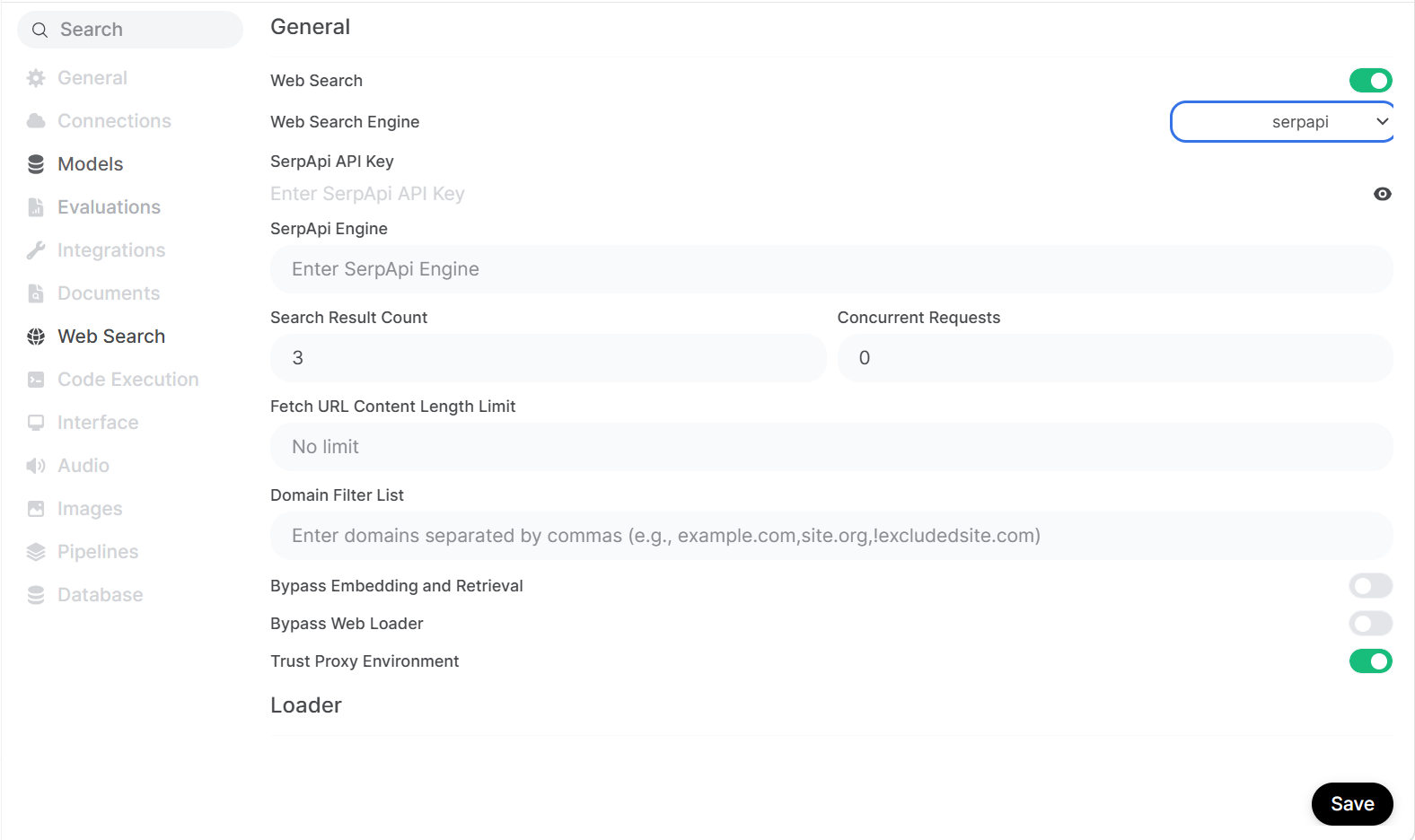
Dashboardand copy the API key. - With
API key, openHridaAI Admin paneland clickSettingstab, and then clickWeb Search. - Enable
Web searchand setWeb Search Enginetoserpapi. - Fill
SerpApi API Keywith theAPI keythat you copied in step 2 from SerpApi dashboard. - [Optional] Enter the
SerpApi enginename you want to query. Example,google,bing,baidu,google_news,google_videos,google_scholarandgoogle_patents.By default, it is set togoogle. Find more options at SerpApi documentation. - Click
Save.
Note
You have to enable Web search in the prompt field to search the web using SerpApi engines.