External
For a comprehensive list of all environment variables related to Web Search (including concurrency settings, result counts, and more), please refer to the Environment Configuration documentation.
Having issues with web search? Check out the Web Search Troubleshooting Guide for solutions to common problems like proxy configuration, connection timeouts, and empty content.
External Web Search API
This option allows you to connect HridaAI to your own self-hosted web search API endpoint. This is useful if you want to:
- Integrate a search engine not natively supported by HridaAI.
- Implement custom search logic, filtering, or result processing.
- Use a private or internal search index.
HridaAI Setup
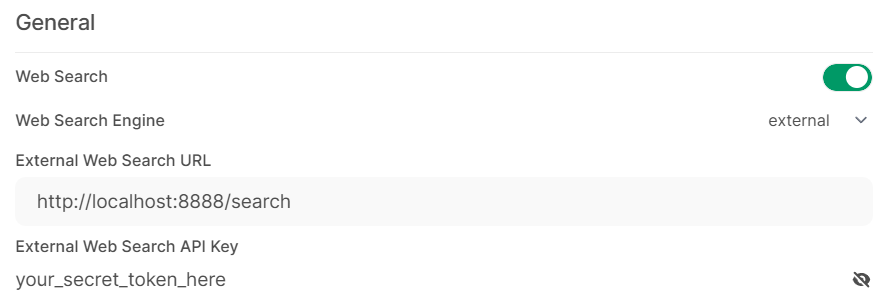
- Navigate to the HridaAI
Admin Panel. - Go to the
Settingstab and then selectWeb Search. - Toggle
Enable Web Searchto the on position. - Set
Web Search Enginefrom the dropdown menu toexternal. - Fill
External Search URLwith the full URL of your custom search API endpoint (e.g.,http://localhost:8000/searchorhttps://my-search-api.example.com/api/search). - Fill
External Search API Keywith the secret API key required to authenticate with your custom search endpoint. Leave blank if your endpoint doesn't require authentication (not recommended for public endpoints). - Click
Save.
API Specification
HridaAI will interact with your External Search URL as follows:
-
Method:
POST -
Headers:
Content-Type: application/jsonAuthorization: Bearer <YOUR_EXTERNAL_SEARCH_API_KEY>
-
Request Body (JSON):
{ "query": "The user's search query string", "count": 5 // The maximum number of search results requested }query(string): The search term entered by the user.count(integer): The suggested maximum number of results HridaAI expects. Your API can return fewer results if necessary.
-
Expected Response Body (JSON): Your API endpoint must return a JSON array of search result objects. Each object should have the following structure:
[ { "link": "URL of the search result", "title": "Title of the search result page", "snippet": "A brief description or snippet from the search result page" }, { "link": "...", "title": "...", "snippet": "..." } // ... potentially more results up to the requested count ]-
link(string): The direct URL to the search result. -
title(string): The title of the web page. -
snippet(string): A descriptive text snippet from the page content relevant to the query.If an error occurs or no results are found, your endpoint should ideally return an empty JSON array
[].
-
Example Implementation (Python/FastAPI)
Here is a simple example of a self-hosted search API using Python with FastAPI and the duckduckgo-search library.
import uvicorn
from fastapi import FastAPI, Header, Body, HTTPException
from pydantic import BaseModel
from duckduckgo_search import DDGS

EXPECTED_BEARER_TOKEN = "your_secret_token_here"

app = FastAPI()

class SearchRequest(BaseModel):
    query: str
    count: int

class SearchResult(BaseModel):
    link: str
    title: str | None
    snippet: str | None

@app.post("/search")
async def external_search(
    search_request: SearchRequest = Body(...),
    authorization: str | None = Header(None),
):
    expected_auth_header = f"Bearer {EXPECTED_BEARER_TOKEN}"
    if authorization != expected_auth_header:
        raise HTTPException(status_code=401, detail="Unauthorized")

    query, count = search_request.query, search_request.count

    results = []
    try:
        with DDGS() as ddgs:
            search_results = ddgs.text(
                query, safesearch="moderate", max_results=count, backend="lite"
            )

        results = [
            SearchResult(
                link=result["href"],
                title=result.get("title"),
                snippet=result.get("body"),
            )
            for result in search_results
        ]

    except Exception as e:
        print(f"Error during DuckDuckGo search: {e}")

    return results

if __name__ == "__main__":
    uvicorn.run("main:app", host="0.0.0.0", port=8888)