YaCy
tip
For a comprehensive list of all environment variables related to Web Search (including concurrency settings, result counts, and more), please refer to the Environment Configuration documentation.
Troubleshooting
Having issues with web search? Check out the Web Search Troubleshooting Guide for solutions to common problems like proxy configuration, connection timeouts, and empty content.
Yacy API
Setup
-
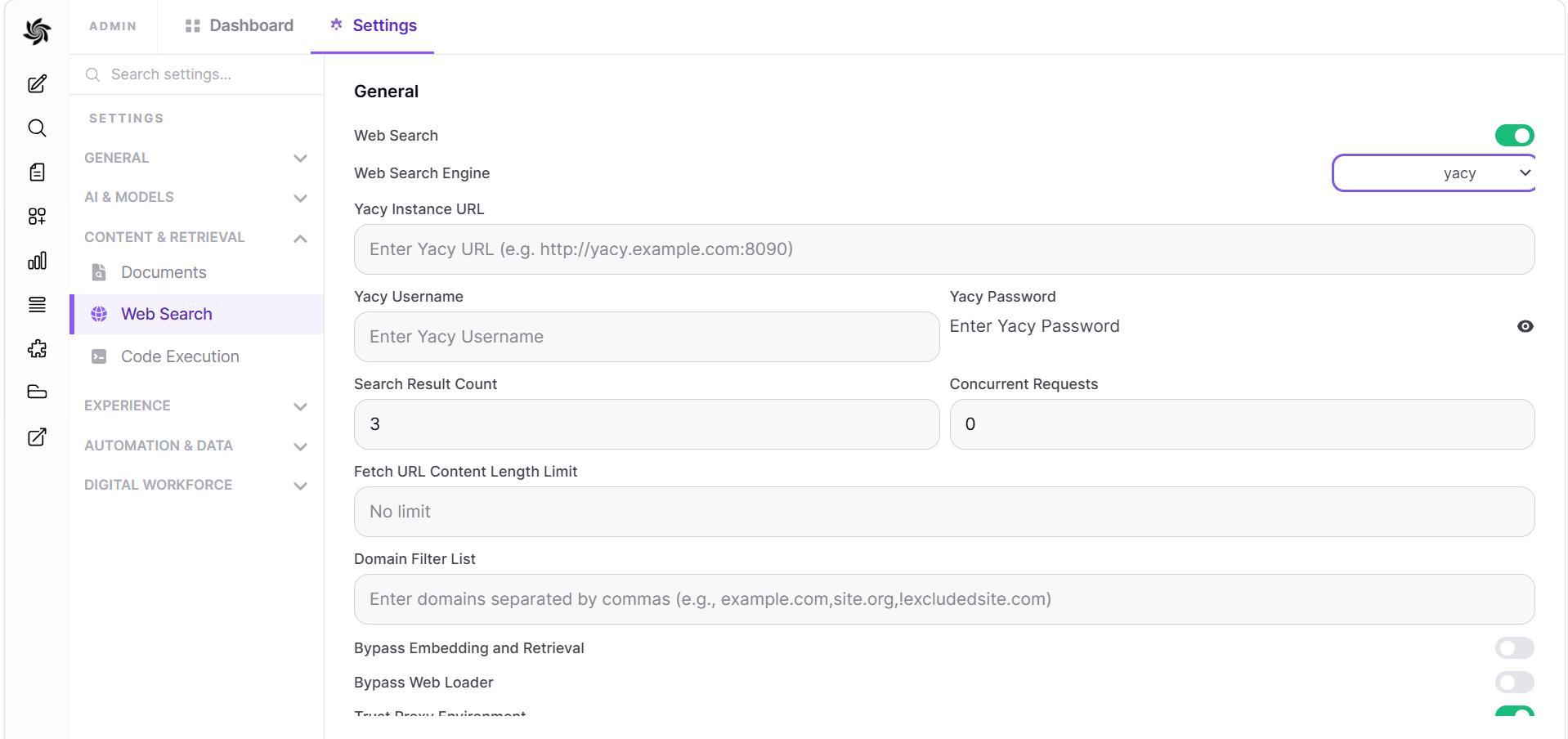
Navigate to:
Admin Panel->Settings->Web Search -
Toggle
Enable Web Search -
Set
Web Search Enginefrom dropdown menu toyacy -
Set
Yacy Instance URLto one of the following examples:http://yacy:8090(using the container name and exposed port, suitable for Docker-based setups)http://host.docker.internal:8090(using thehost.docker.internalDNS name and the host port, suitable for Docker-based setups)https://<yacy.local>:8443(using a local domain name, suitable for local network access)https://yacy.example.com(using a custom domain name for a self-hosted Yacy instance, suitable for public or private access)https://yacy.example.com:8443(using https over the default Yacy https port)
-
Optionally, enter your Yacy username and password if authentication is required for your Yacy instance. If both are left blank, digest authentication will be skipped
-
Press save